
Place your ad here - 320x50

PDF to JPG 21.1
Last update:
Mon, 21 September 2026, 6:00:04 am
Submission date:
Wed, 25 July 2012, 7:00:13 am
Vote for this product
Place your ad here - 728x90
PDF to JPG description
Place your ad here - 336x280
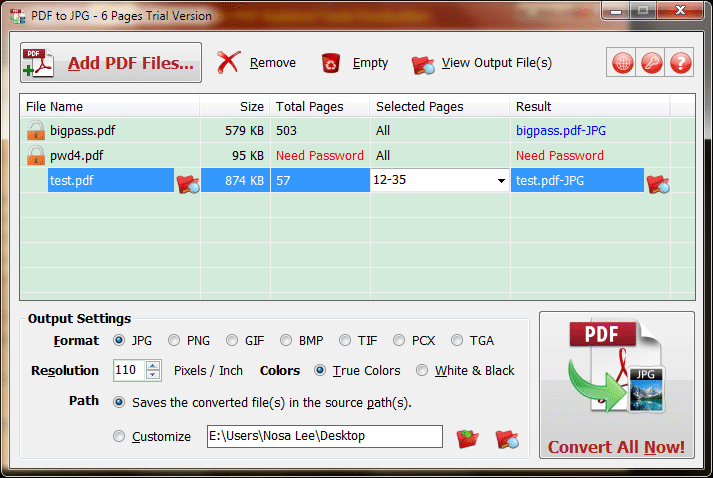
Converts PDF files to JPG, PNG, BMP, TIF, GIF, PCX and TGA images in batch mode.
PDF to JPG is used to convert PDF files to JPG, PNG, BMP, TIF, GIF, PCX and TGA images in batch mode. It works without Adobe Acrobat or Adobe Reader, and has Command Line Interface (CLI), fast and accurate conversion ability, friendly GUI, small size. It retains the original appearance of PDF files in the output jpg/png/bmp and other image files. Also, PDF to JPG supports system level context menu, Unicode PDF file name and content, converting the password-protected PDF files, setting output resolution and colors, rotating output images, combine output images, adding header / footer for protecting your copyright, and specifying page range to convert. Key features: supports Command Line Interface (CLI). Fast, accurate, small, and friendly interface. Working without Adobe Acrobat or Adobe Reader. Supports setting the resolution (pixels/inch) and colors for output images. Supports rotating output images. Supports combining output images. Supports adding header / footer for protecting your copyright. Supports converting PDF files to JPG, PNG, BMP, TIF, GIF, PCX, TGA images. Retains the original appearance in the output jpg/png/bmp and other image files. Supports converting PDF to images in batch mode. Supports processing the password-protected PDFs. Supports specifying page range of PDF files to convert. Supports Unicode PDF file name and content. Requirements: .NET 2.0 or later. What's new in this release: Supports to customize the format of file number for the output images, includes "Natural number" and "With leading zeros". The custom rotation angle cannot be set. Optimized the Tab order of all controls for the Options interface. And more. Place your ad here - 728x15
Comments (0)
FAQs (0)
History
Promote
Author
Analytics
Videos (0)
Share this page


• Audio (646)
• Business & Finance (2483) • Desktop Enhancements (295) • Games (392) • Home & Education (766) • Networks & Internet (1292) • Multimedia & Design (556) • Software Development (314) • Utilities (8220) • Web Authoring (255) • eBooks (5) • Graphics (580) Translate with Google


Related downloads
• Ailt PDF to GIF Converter 7.1
Batch convert PDF to GIF. • PDF-ShellTools 3.4.2 Manage PDFs directly from the Windows Shell • Ailt XLS to DOC Converter 7.1 Batch convert Excel to Word. • Card Designing Application 8.2.3 Smart card design tool craft unique ID cards • Birthday Greetings Tool 8.1 Card maker tool makes stunning birthday cards • Abex PDF to Flash Converter 4.5 Abe PDF to Flash Converter is easy and... • Design Name Card 9.3.0.1 Design Name Card best image designing tool • Tour and Training Management Software 5.0.1.5 Tour scheduling program generate staff record • Ailt PDF to PowerPoint Converter 7.1 Batch convert PDF to PowerPoint. • Hr Training 5.0.1.5 Program maintains workers bulk travel report More >>> Top downloads in this category
1. All-Business-Letters for Windows 6.3.0.2
Downloads: 962 2. SharePoint Document Viewer 1.2.722.0 Downloads: 819 3. eXcelator CTR 2.2.0 Downloads: 775 4. SharePoint Data Connector 2.3.722.0 Downloads: 675 5. DiffEngineX 3.10 Downloads: 647 6. Express Invoice Free Invoicing Software 13.00 Downloads: 639 7. ReliefJet Essentials for Outlook 5.1.0 Downloads: 635 8. WP Blog Poster 1.0 Downloads: 635 9. Express Invoice Plus 13.00 Downloads: 632 10. PDFArea HTML to PDF Converter Free 3.2 Downloads: 599 More >>> |
Contact Us | Submit Software | Link to Us | Terms Of Service | Privacy Policy |
Editor Login
InfraDrive Tufoxy.com | hunt your software everywhere.
© 2008 - 2026 InfraDrive, Inc. All Rights Reserved
InfraDrive Tufoxy.com | hunt your software everywhere.
© 2008 - 2026 InfraDrive, Inc. All Rights Reserved