
Place your ad here - 320x50

Tipard MXF Converter for Mac 9.1.36
Last update:
Mon, 21 September 2026, 6:00:04 am
Submission date:
Mon, 14 October 2013, 12:00:05 pm
Vote for this product
Place your ad here - 728x90
Tipard MXF Converter for Mac description
Place your ad here - 336x280
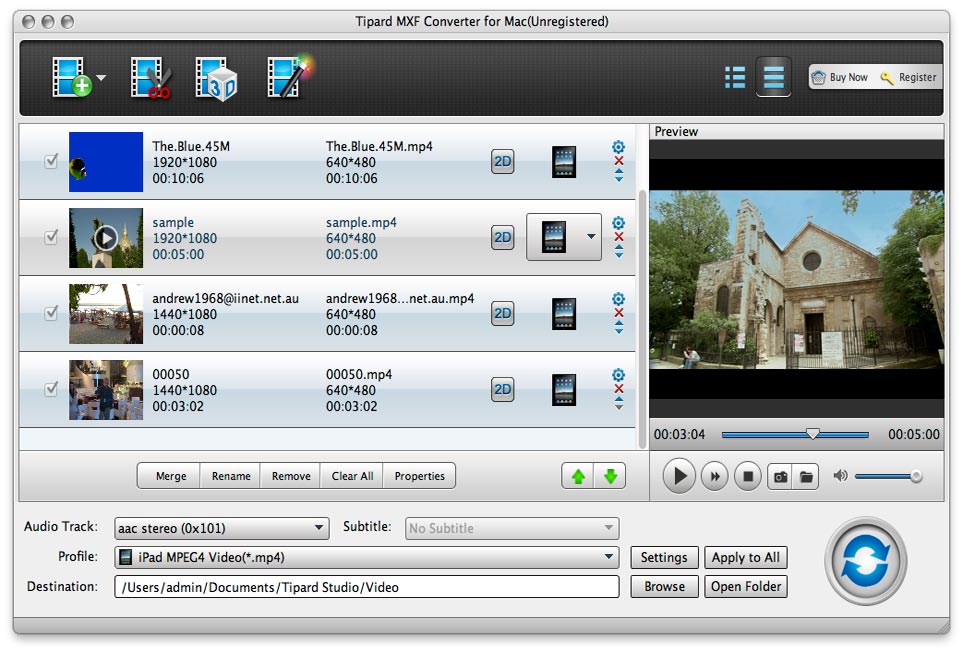
Convert MXF to various popular video/audio formats on Mac.
Tipard MXF Converter for Mac is able to convert MXF files recorded from Canon, Panasonic, Sony, etc. like TS, MTS, M2TS, TP, TRP to various popular video formats(MP4, MOV, MKV, WMV, AVI, H.265, MKV, H.264/MPEG-4 AVC, FLV, etc.) and audio formats(AAC, AC3, AIFF, MP3, MP2, WAV, WMA, etc.). It can also assist users in converting MXF videos to 3D video format for popular 3D media players. Key Features: 1. Convert MXF files to other video/audio formats With Tipard MXF Converter for Mac you are able to convert MXF to MP4, 3GP, AVI, MKV, WMV, FLV, SWF, VOB, DV, MPG, AAC, AC3, AIFF, MP3, MP2, WAV, WMA, etc. And it can encode MXF footage in full 1080p HD quality. 2. Convert MXF to portable media devices Tipard MXF Converter for Mac is available to convert MXF videos to other formats which can be played well on Apple devices, Android devices, game players, HD Media Players, especially for iPhone, iPad, Apple TV, Samsung, PSP, etc. 3. Transcode MXF files for editing software like iMovie, Final Cut Pro, Adobe Premiere Pro, QuickTime, etc. With the transcoding function, you are allowed to make MXF format supported by various Video Editing Software tools, including iMovie, Final Cut Pro, Adobe Premiere Pro, QuickTime, etc. 4. Strong editing functions This MXF converter enables you to trim video length, crop video frame to remove blank edges, add text/image watermark and define text color, and merge several videos into one file. Also you can adjust video brightness, saturation, contrast, hue, and volume. Requirements: 512MB RAM, Super VGA (800×600) resolution, 16-bit graphics card or higher What's new in this release: Fix some bugs. Place your ad here - 728x15
Comments (0)
FAQs (0)
History
Promote
Author
Analytics
Videos (0)
Share this page


• Audio (646)
• Business & Finance (2483) • Desktop Enhancements (295) • Games (392) • Home & Education (768) • Networks & Internet (1293) • Multimedia & Design (556) • Software Development (314) • Utilities (8222) • Web Authoring (255) • eBooks (5) • Graphics (580) Translate with Google


Related downloads
• AnyMP4 DVD Creator 7.5.8
Burn any video to a DVD/Blu-ray disc. • Tipard Video Converter for Mac 9.1.50 Convert any video and audio on Mac. • AnyMP4 MP4 Converter 7.2.36 Convert DVD/video to MP4 video format. • Bigasoft Total Video Converter for Mac 5.8.2.9497 Convert between various video files on Mac • Express Dictate Pro for Mac 9.00 Express Dictate for Mac OS X • AnyMP4 DVD Copy 3.1.86 Copy DVD to disc/folder/ISO on PC • Free MP3 Cutter Joiner 2026.2 Cut and Join MP3 in simple way • Free Video Converter 2026 All-in-one powerful free video converter • Sidify Apple Music Converter for Mac 5.4.3 Convert Apple Music songs to MP3, AAC, FLAC, WAV, AIFF or ALAC • Aiseesoft Video Converter for Mac 9.2.56 convert videos on Mac More >>> Top downloads in this category
1. Photosounder 1.9.5
Downloads: 2,807 2. Tipard DVD Ripper Pack for Mac 4.2.96 Downloads: 1,165 3. Tipard Video Converter for Mac 9.1.50 Downloads: 1,042 4. Tipard DVD Software Toolkit 6.5.90 Downloads: 827 5. mediAvatar DVD to iPad Converter for Mac 6.6.0.0623 Downloads: 793 6. iSkysoft iPhone Ringtone Maker for Mac 1.6.0 Downloads: 650 7. AnyMP4 MTS Converter for Mac 8.2.22 Downloads: 643 8. Bigasoft Total Video Converter for Mac 5.8.2.9497 Downloads: 617 9. Modem Recorder 3.5.1.9938 Downloads: 592 10. Free MP3 Cutter Joiner 2026.2 Downloads: 586 More >>> |
Contact Us | Submit Software | Link to Us | Terms Of Service | Privacy Policy |
Editor Login
InfraDrive Tufoxy.com | hunt your software everywhere.
© 2008 - 2026 InfraDrive, Inc. All Rights Reserved
InfraDrive Tufoxy.com | hunt your software everywhere.
© 2008 - 2026 InfraDrive, Inc. All Rights Reserved