
Place your ad here - 320x50

TuneMobie Apple Music Converter 8.8.1
Last update:
Mon, 21 September 2026, 6:00:04 am
Submission date:
Sat, 21 October 2017, 11:00:03 am
Vote for this product
Place your ad here - 728x90
TuneMobie Apple Music Converter description
Place your ad here - 336x280
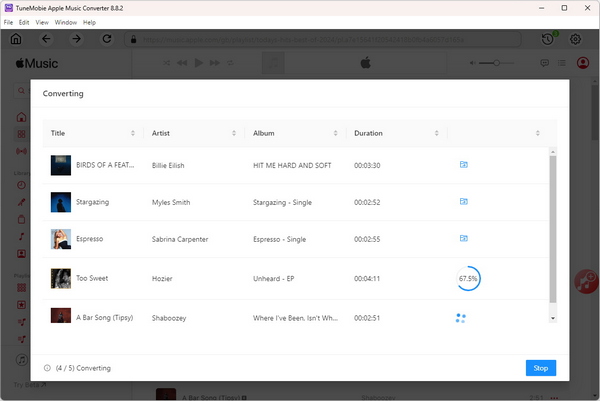
Convert Apple Music to MP3/M4A/WAV/FLAC with ID3 tags kept at 10X faster speed
TuneMobie Apple Music Converter can convert Apple Music songs, albums and playlists to MP3, M4A, WAV, AIFF or FLAC for iPod Nano, iPod Shuffle, PSP, PS3, PS4, Sony Walkman and any MP3 players. You can also use the output files in various apps as background music. TuneMobie Apple Music Converter supports 10X faster conversion speed and helps you convert a bunch of Apple Music tracks with 100% audio quality kept. It also preserves all ID tags like title, album, artist, track number and artwork. It allows you to rename output files by title, artist, album, track number, hyphen, space, etc., sort output files into folders by album or artist. TuneMobie Apple Music Converter is very easy-to-use, it comes with a built-in Apple Music web player and allows you to add albums and playlists to conversion list easily. TuneMobie Apple Music Converter is fully compatible with Windows 7, 8, 8.1, 10 and Windows 11. The output MP3 or M4A music files converted from Apple Music songs can be permanently kept on your hard drive even yous unsubscribe Apple Music. You can enjoy your favorite Apple Music songs on any devices anytime without any limitation. Requirements: Windows 7/8/8.1/10/11 (64-bit) What's new in this release: 1. Solved the downloading failure caused by website update. Place your ad here - 728x15
Comments (4)
FAQs (0)
History
Promote
Author
Analytics
Videos (0)
Share this page


• Audio (646)
• Business & Finance (2475) • Desktop Enhancements (295) • Games (392) • Home & Education (766) • Networks & Internet (1291) • Multimedia & Design (540) • Software Development (314) • Utilities (8146) • Web Authoring (254) • eBooks (5) • Graphics (578) Translate with Google


Related downloads
• AnyMP4 DVD Creator 7.5.8
Burn any video to a DVD/Blu-ray disc. • Tipard Video Converter for Mac 9.1.50 Convert any video and audio on Mac. • AnyMP4 MP4 Converter 7.2.36 Convert DVD/video to MP4 video format. • Bigasoft Total Video Converter for Mac 5.8.2.9497 Convert between various video files on Mac • Express Dictate Pro for Mac 9.00 Express Dictate for Mac OS X • AnyMP4 DVD Copy 3.1.86 Copy DVD to disc/folder/ISO on PC • Free MP3 Cutter Joiner 2026.2 Cut and Join MP3 in simple way • Free Video Converter 2026 All-in-one powerful free video converter • Sidify Apple Music Converter for Mac 5.4.3 Convert Apple Music songs to MP3, AAC, FLAC, WAV, AIFF or ALAC • Aiseesoft Video Converter for Mac 9.2.56 convert videos on Mac More >>> Top downloads in this category
1. Photosounder 1.9.5
Downloads: 2,817 2. Tipard DVD Ripper Pack for Mac 4.2.96 Downloads: 1,180 3. Tipard Video Converter for Mac 9.1.50 Downloads: 1,051 4. Tipard DVD Software Toolkit 6.5.90 Downloads: 835 5. mediAvatar DVD to iPad Converter for Mac 6.6.0.0623 Downloads: 799 6. AnyMP4 MTS Converter for Mac 8.2.22 Downloads: 651 7. iSkysoft iPhone Ringtone Maker for Mac 1.6.0 Downloads: 651 8. Bigasoft Total Video Converter for Mac 5.8.2.9497 Downloads: 629 9. Modem Recorder 3.5.1.9938 Downloads: 605 10. Sidify Apple Music Converter for Mac 5.4.3 Downloads: 601 More >>> |
Contact Us | Submit Software | Link to Us | Terms Of Service | Privacy Policy |
Editor Login
InfraDrive Tufoxy.com | hunt your software everywhere.
© 2008 - 2026 InfraDrive, Inc. All Rights Reserved
InfraDrive Tufoxy.com | hunt your software everywhere.
© 2008 - 2026 InfraDrive, Inc. All Rights Reserved